Introduction: Why Managing Kids Screen Time Matters in 2025
In today’s digital world, screens are everywhere — from smartphones and tablets to TVs and gaming consoles. While technology has its benefits, managing kids screen time has become one of the biggest challenges for modern parents.
Studies show that excessive screen time can impact children’s sleep, concentration, and emotional health. However, completely banning screens isn’t practical either — technology is a big part of education, communication, and entertainment.
This article will help you create a balanced approach that promotes healthy screen habits while encouraging creativity, learning, and family connection.
📱 Section 1: Understanding the Impact of Screen Time on Children
Before setting limits, it’s important to understand how screen exposure affects kids differently depending on their age and development.
1. Physical Health
-
Too much screen time can lead to eye strain, headaches, and poor posture.
-
Lack of outdoor activity can result in obesity or lower physical fitness.
💡 Tip: Encourage short breaks every 20–30 minutes to prevent digital eye strain.
🔗 Read more about AI Tools to Boost Productivity in 2025.
2. Mental and Emotional Development
-
Children who overuse devices may face reduced attention span and increased irritability.
-
Social media exposure can create unrealistic expectations and affect self-esteem.
3. Sleep Disruption
Blue light from screens suppresses melatonin, the hormone responsible for sleep. Experts recommend turning off screens at least 1 hour before bedtime.
⏳ Section 2: Recommended Screen Time by Age Group
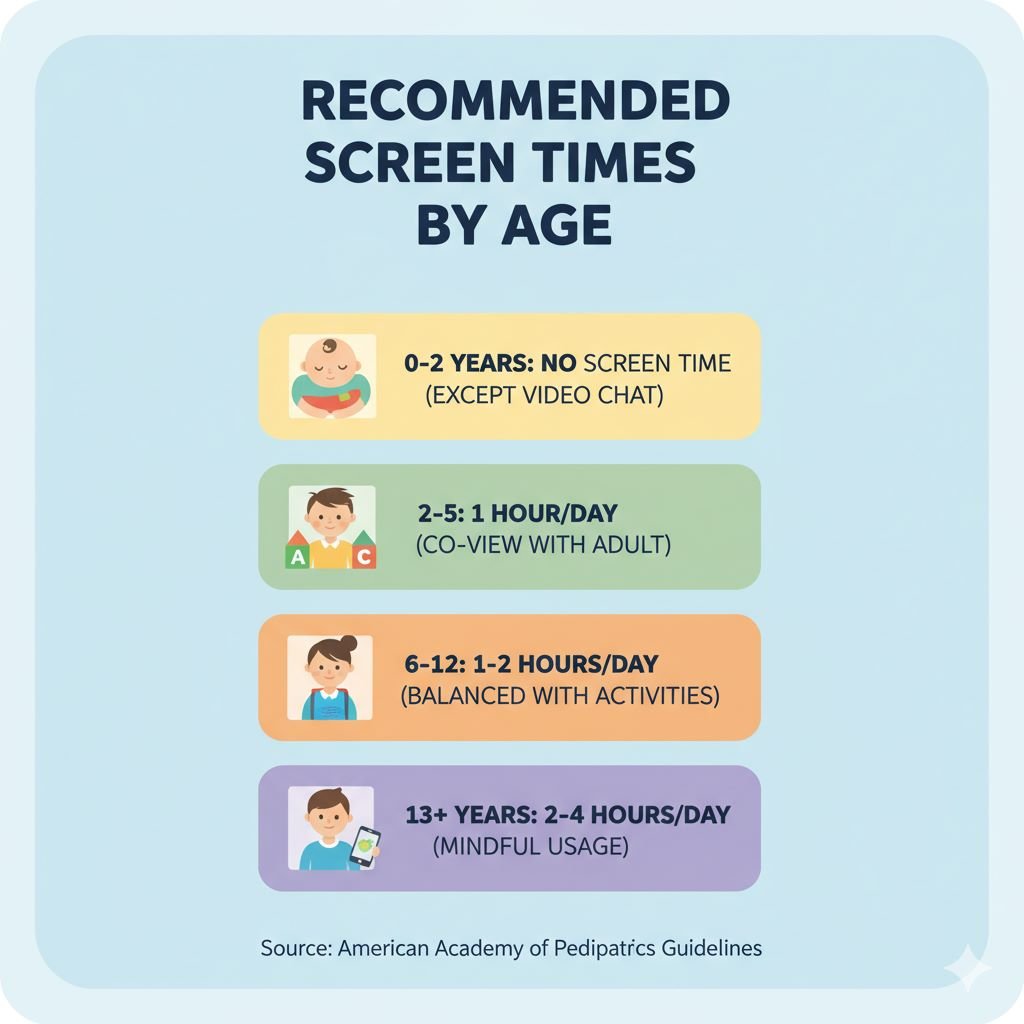
Here’s a quick guide based on expert recommendations (from the American Academy of Pediatrics):
| Age Group | Recommended Screen Time | Tips |
|---|---|---|
| Under 2 years | Avoid screens (except video chatting) | Focus on playtime and face-to-face interaction |
| 2–5 years | 1 hour per day | Choose high-quality, educational content |
| 6–12 years | 1–2 hours | Encourage physical activity and family engagement |
| Teenagers (13–18 years) | 2–3 hours (non-school) | Monitor online activities and screen-free bedtime |
💡 Consistency is key. Create and follow a family media plan.
🏡 Section 3: Practical Tips for Managing Kids Screen Time
1. Create a Screen Schedule
Establish a daily or weekly media routine that includes both screen and non-screen activities.
Example:
-
Homework: ✅
-
Outdoor play: ✅
-
1 hour of YouTube or games: ✅
-
Family dinner: 📵 Screen-free zone
2. Encourage Screen-Free Spaces
Keep devices out of bedrooms and dining areas. Use those spaces for reading, sleeping, or bonding time.
3. Use Parental Control Apps
There are great apps that help track and manage screen usage:
-
Google Family Link
-
Apple Screen Time
-
Qustodio
-
Bark
These tools let you set limits, monitor content, and block harmful sites.
🔗 External Link: Google Family Link
🔗 Read More about Must-Have Apps for Students.
4. Be a Role Model
Kids learn from what they see. If you’re scrolling during dinner, they’ll do the same.
Set an example by practicing digital discipline.
5. Encourage Productive Screen Time
Not all screen time is bad. Encourage:
-
Educational games like Khan Academy Kids
-
Creative tools like Tynker or Scratch
-
Family learning videos on YouTube Kids
🧩 Section 4: Building Healthy Digital Habits
1. Teach Mindful Technology Use
Help children understand why they are using devices — entertainment, communication, or learning.
2. Schedule “Digital Detox Days”
Once a week, have a no-screen day filled with offline activities — art, cooking, or outdoor games.
3. Replace Screens with Engaging Alternatives
-
Board games 🎲
-
Storytelling 📖
-
Family walks 🚶♂️
-
Music and dance 🎵
4. Talk About Online Safety
Educate children about:
-
Not sharing personal details
-
Recognizing cyberbullying
-
Avoiding strangers online
🔗 External Link: National Online Safety – Tips for Parents
🧘 Section 5: Managing Screen Time for Different Age Groups
Toddlers (2–5 years)
-
Co-watch with them to explain what they see.
-
Choose interactive and educational content.
School-age Kids (6–12 years)
-
Create screen contracts together.
-
Use reward systems — e.g., finish homework → 30 mins of games.
Teenagers
-
Encourage open discussions about social media use.
-
Teach them to limit multitasking — no phone during study hours.
💬 Section 6: Communication is Key
Make screen management a collaborative process, not punishment.
Ask your child questions like:
-
“What’s your favorite online activity?”
-
“How does it make you feel?”
-
“Do you feel distracted when using your phone?”
This approach builds trust and encourages self-regulation.
🌙 Section 7: Managing Screen Time During Holidays and Weekends
During breaks, screen time often increases — that’s okay in moderation.
Tips for balance:
-
Schedule outdoor family trips.
-
Set screen-free mornings for reading or exercise.
-
Use apps like Forest that reward kids for staying off devices.
🧭 Section 8: When to Seek Professional Help
If your child:
-
Becomes aggressive when the screen is removed
-
Neglects school or social life
-
Stays up late on devices daily
…you might consider consulting a child psychologist or digital wellness expert.
Early intervention can prevent screen addiction.

❓ FAQs About Managing Kids Screen Time
Q1. How much screen time is healthy for a child?
For kids aged 6–12, 1–2 hours per day of recreational screen time is ideal.
Q2. Is educational screen time different from entertainment?
Yes — educational content supports learning, while excessive entertainment can lead to overuse.
Q3. How do I make screen time productive?
Encourage creative and educational apps instead of passive video watching.
Q4. What should I do if my child refuses to follow limits?
Involve them in decision-making, offer rewards, and stay consistent.
Q5. How can I reduce screen time without conflicts?
Start gradually, offer fun offline alternatives, and communicate openly.
🧾 Conclusion
Managing kids screen time isn’t about strict control — it’s about balance and awareness. When guided properly, screens can become powerful tools for education and creativity rather than distractions.
Start small: set limits, be consistent, and most importantly, stay involved in your child’s digital world. With the right approach, you can raise mindful, tech-smart kids ready for the digital future.